

Download it FREE from App Depot package manager.
Stop hand-coding forms. Visual Designer is a drag-and-drop GUI builder for JavaScript applications built with swing-ui. Lay out a complete, polished form in seconds — then let Visual Designer generate the UI definition your app reads and renders the form at runtime.
Why Visual Designer?
Building a GUI by hand in code is slow: you’re writing layout logic, wiring up components, and re-running your app just to nudge a button two pixels to the left. Visual Designer replaces all of that with a visual canvas. Drag components where you want them, arrange your hierarchy, and you’re done — no boilerplate, no guesswork.
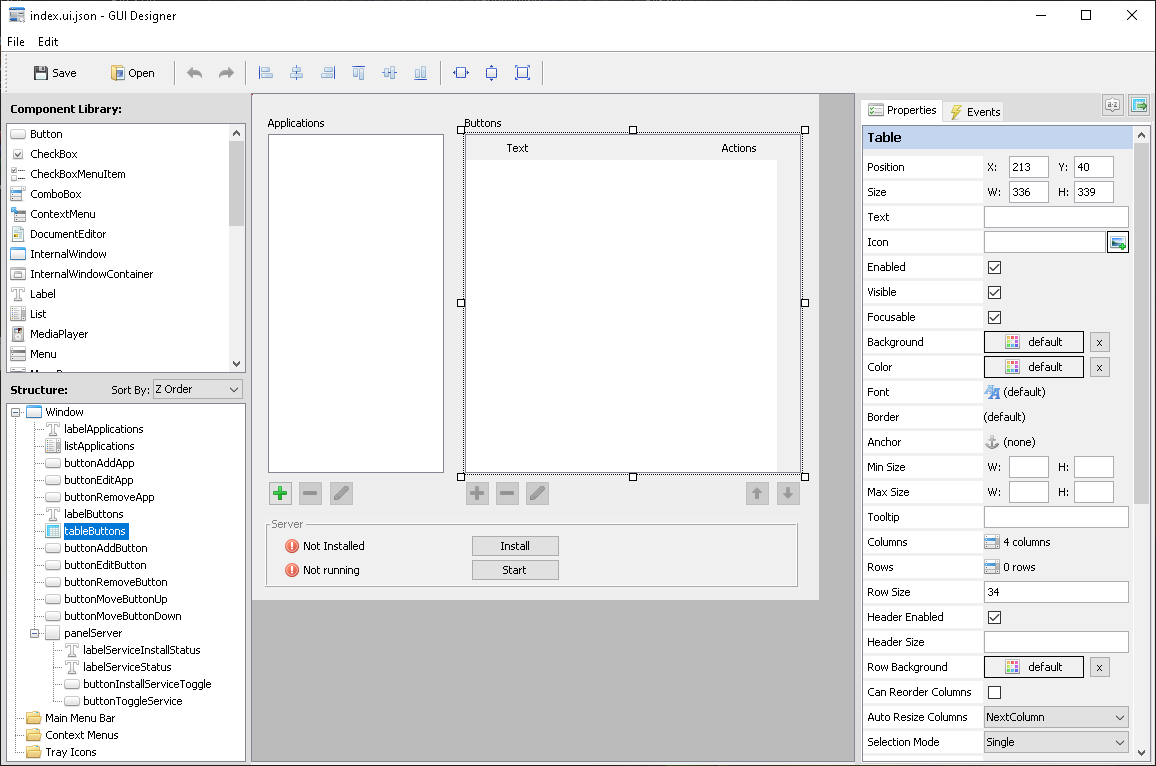
Features
- Drag-and-drop form building — Compose beautiful forms in seconds instead of coding the GUI by hand in JavaScript.
- Full component library — Every Java Swing component is available, plus a MediaPlayer component for video and audio playback, including audio and video input devices, such as web camera and microphone.
- Component tree view — A tree panel on the left shows the full hierarchy of components on your form, so you always know what’s nested inside what.
- Position snapping — Components snap into alignment automatically, so your layouts look clean and consistent without manual pixel-pushing.
- Anchor-based layout — Instead of hardcoding pixel coordinates, each component is positioned by anchoring its edges to its container’s edges, so the form adapts cleanly when resized.
- Free to use — Download Visual Designer for free from App Depot, our package manager app.
How It Works
- Open your class file. Open your JavaScript class file that extends the
Windowcomponent in the Visual Designer . - Generate the definition. Visual Designer creates a
.ui.jsonfile describing your form, according to our published schema: https://swing-ui.com/schemas/ui-definition/1.0/schema.json - Design visually. Drag components onto the canvas, arrange them in the component hierarchy tree.
- Load it in your app. Your
Windowclass reads the generated UI definition file at runtime — no manual layout code required. - Reference components from your code using components’ names you assign in the visual designer. For component name
buttonSaveSettingsyou would reference it asmyForm.butonSaveSettings.text("New text"), orthis.butonSaveSettings.text("New text")wherethisrefers to theWindowcomponent.