

Revolutionizing Desktop Application Development with swing-ui
For years, developers have struggled to build desktop applications using JavaScript. Traditionally, JavaScript has been confined to web development, and creating native desktop applications required expertise in languages like C++, Java, or C#. This barrier has deterred many developers from bringing their creative ideas to desktop platforms. With Electron it became possible, but it remains a browser-based solution that relies on HTML and CSS, complex frameworks like React, Vue, or Svelte. It introduces significant overhead, consumes substantial RAM, unnecessarily complicates development, and bundling electron with JavaScript project make the application size huge.
However, the landscape is changing dramatically with the introduction of the swing-ui Node.js module. swing-ui seamlessly bridges the gap between JavaScript and Java Swing GUI components by serving as an API, and bringing the power of JavaScript to desktop application development. Now, building desktop applications with only JavaScript is not just possible; it’s remarkably easy and fun. JavaScript may not be the best fit for all types of applications (such as applications requiring high performance graphics), but it can definitely be suitable for a large portion of them.
Key Features of swing-ui
- Simple API: Swing-UI provides an intuitive and straightforward API, making it incredibly easy to learn and use. Now developers can create rich, native desktop applications with minimal effort. Check out the API Reference.
- Cross-Platform: Swing-UI is built with cross-platform support in mind. Whether you are targeting Windows, macOS, or Linux OS, Node.js, Bun, or Deno JavaScript runtimes,
swing-uiensures your application runs seamlessly across all major operating systems and runtimes. - Rich UI Components: The module provides access all Java Swing UI components library, making it easier to design and implement user interfaces. These components are highly enhanced and customizable to fit the specific needs of your application. Additionally many Swing UI components were extended to add many more features than plain Swing library has. A MediaPlayer component, capable of playing video and audio from file, input devices and URL (file and live stream), was created for playing media while utilizing FFMPEG capabilities.
- Efficiency and Performance: Although
swing-uiis written in JavaScript, it uses a synchronous, blocking event loop, similar to many other popular programming languages. This design ensures your code executes sequentially, avoiding the need for numerous callbacks or use ofawaitkeywords and Promises to query UI for data, such as component state, file selection, dialog confirmation, clipboard data and more.
Why Java Swing?
The Java Swing library was chosen for this module because it offers a robust, cross-platform framework that has proven reliable over time. Since Node.js/Bun/Deno are cross-platform, it only makes sense to couple JavaScript with also cross-platform GUI. Java Swing UI library provides a rich collection of feature-packed components, which we enhanced even farther, making it ideal for building sophisticated user interfaces while ensuring consistency and stability across different environments.
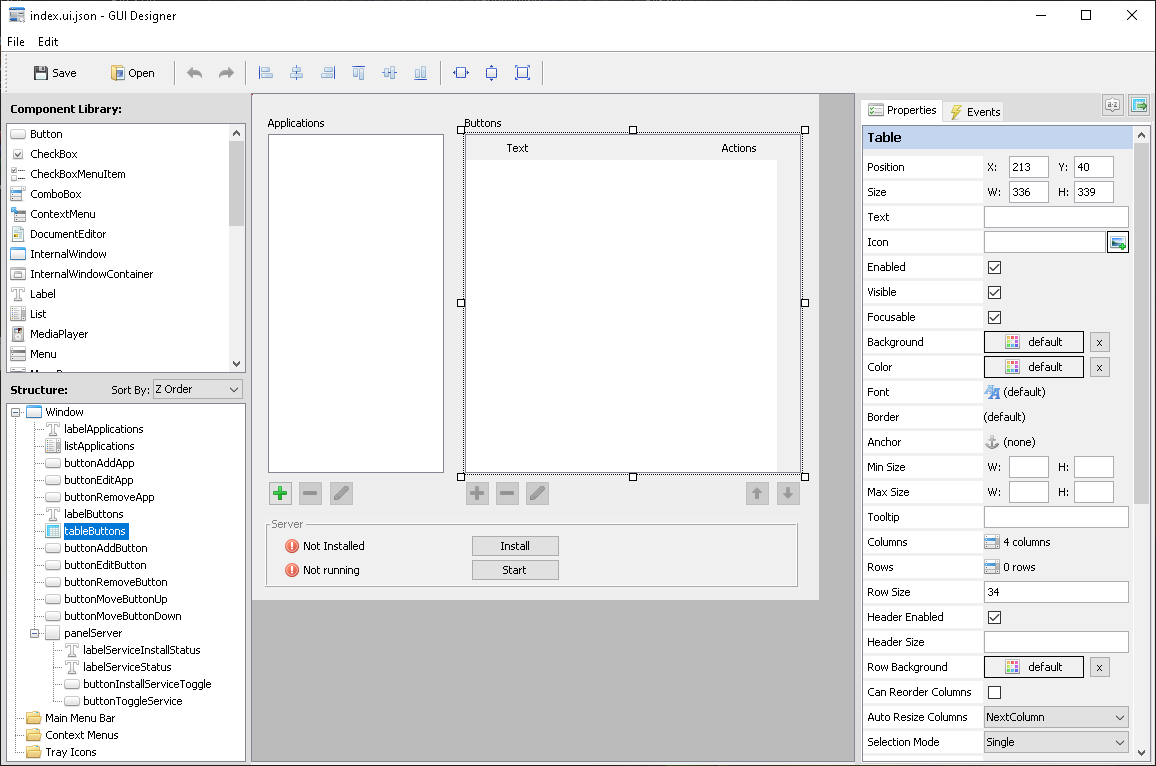
Plain Java Swing library wasn’t enough, so we enhanced/upgraded the components, added new modern UI themes, made sure you can position and size your UI components without having to deal with predefined layouts. Forms can be built with our free visual GUI designer eliminating the need to code GUI at all. It gives a fresh modern user experience that doesn’t feel like old Java anymore. With our custom MediaPlayer component you can now play or stream audio and video from a file, URL, local or remote web cam, and more. It supports what ever your installed version of FFMPEG supports.
With just a few lines of code, you can create a basic desktop application in few minutes. The simplicity and power of swing-ui‘s API allow you to focus on the functionality and design of your application rather than difficulties of the web development for a desktop application.
Swing-UI revolutionizes the way we approach desktop application development. By empowering developers to use JavaScript for creating native-looking desktop applications, swing-ui opens up a world of possibilities. JavaScript developers are no longer constrained to web applications; now they can leverage their JavaScript skills to bring full-fledged, desktop applications to life in a fraction of the time.
Our visual UI designer app clearly demonstrates what can be built with our swing-ui GUI module, because this designer app is built on swing-ui.
UI Definition File Schema
Here is published UI definition file schema by which GUI designer builds the GUI for your app.
https://swing-ui.com/schemas/ui-definition/1.0/schema.json
You can direct your AI to build the GUI for your Window using this schema, and it will know exactly what to do.
AI Aided Rapid Development
We’ve built a ready-to-use skill that teaches Claude (and potentially other AI agents) how to build apps with the swing-ui GUI module:
http://swing-ui.com/ai/skill/swing-ui-gui-module.zip
Latest Version: 1.0.0
We continuously refine this skill to improve how well AI models understand the module. Check back periodically for updates.